
Neural Junkie is a desktop hub where you run multiple AI specialists on your hardware — repo experts, security reviewers, architects, custom domain experts — under your control.
Specialists get smarter over time. They index your codebase. They answer questions in channels and collaborations. They build up patterns you actually use.
The question becomes: how do you capture and reuse that expertise?
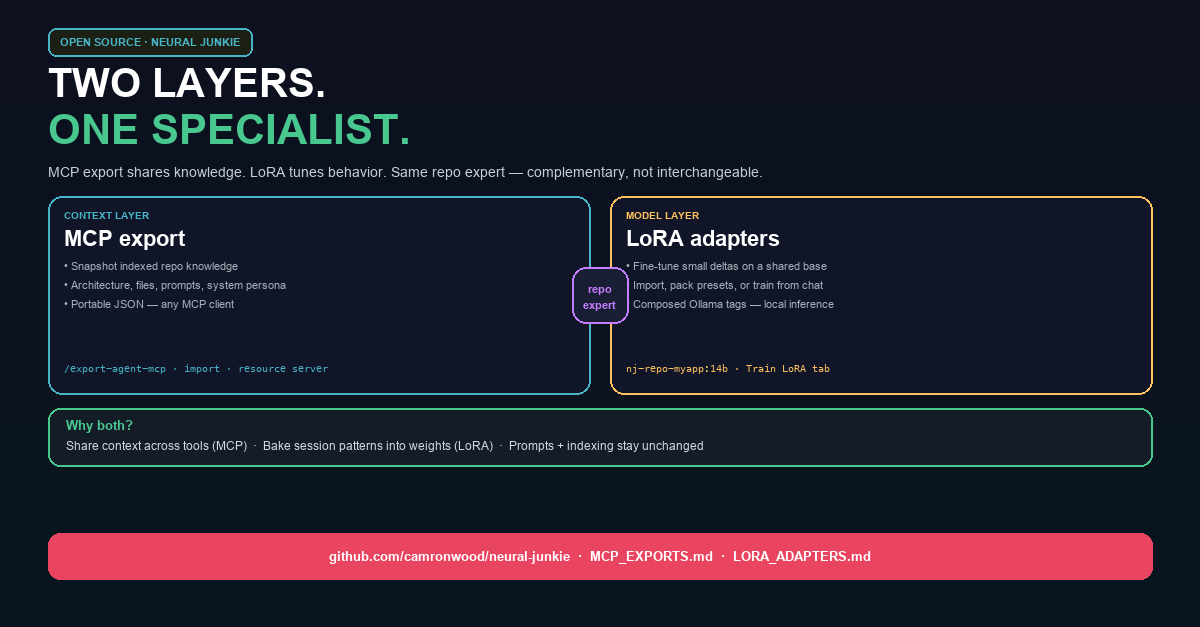
We answer with two mechanisms that look similar from the outside but operate at different layers:
- MCP export — portable knowledge (context, prompts, indexed repo artifacts)
- LoRA — portable behavior (small weight adapters on a shared base model)
Same specialist. Two layers. Complementary, not interchangeable.
The problem: prompts alone hit a ceiling
System prompts, personas, and RAG are necessary. They’re also not always enough.
Context without portability. Your repo expert knows the architecture — but that knowledge lives inside Neural Junkie until you copy-paste or re-index elsewhere.
Behavior without depth. A security reviewer can sound like security review in a prompt. Domain-tuned inference — weights that lean toward your codebase and your team’s Q&A patterns — is a different thing.
Cost without sharing. Pulling a separate full model per role burns disk and RAM. You want one base, many specialists — and a way to hand expertise to teammates or other tools.
That’s why we built both export paths.
Layer 1: MCP export — share the knowledge
Model Context Protocol (MCP) is a standard way to expose resources and prompts to AI tools. Neural Junkie’s Export to MCP snapshots a repo agent’s indexed knowledge into a JSON package:
- Architecture overview and code patterns
- Key files and important source snippets
- Dependencies, git context, system prompt
- Pre-built prompt templates (
analyze_architecture,explain_code, …)
Save it under ~/.neural-junkie/exports/, check it into git, or import it on another machine with /import-agent-mcp.
Why we use it:
- Portability — hand expertise to Claude Desktop, an IDE MCP client, or a teammate without re-indexing from scratch
- Backup — export before deleting an agent; restore later
- Interop — optional MCP resource server (
ENABLE_MCP_RESOURCES=true) serves exports to external clients
MCP export does not change the model. It packages what the agent knows as structured context any MCP-aware tool can consume.
Layer 2: LoRA — bake the behavior
LoRA (Low-Rank Adaptation) fine-tunes a small adapter on top of a shared Ollama base (e.g. qwen2.5-coder:14b). The hub composes tags like nj-security:14b or nj-repo-myapp:14b — tens of megabytes, not tens of gigabytes.
Three ways in:
- Import from Hugging Face → Model library → Compose & import
- Pack presets — Specialist tuning pack bootstrap adapters (security, code-review, backend, biology)
- Train from your history — channel/DM transcripts, collaboration outputs, repo-agent Q&A → JSONL → Unsloth →
ollama create
Why we use it:
- Model-layer specialization — adjust how the LLM generates, not just what you paste into the prompt
- Efficiency — one base pull, many composed tags for different roles
- Repo fluency from sessions — after 10+ Q&A turns, Train LoRA from agent info turns chat into a repo-specific adapter
Prompt personas and the context stack stay the same. LoRA adjusts the layer underneath. Collaboration gates, file approvals, and MCP tools all work unchanged.
Same repo expert, both layers
A typical workflow:
/create-repo-agenton your codebase — index architecture, key files, patterns- Accumulate Q&A in channels and collaborations
- Export to MCP — share portable knowledge with the team or external MCP clients
- Train LoRA (optional) — compose
nj-repo-myapp:14band assign it back to the same expert
MCP answers: “Here’s what this expert knows, in a standard file.”
LoRA answers: “Here’s a local model tag that behaves more like this expert without re-explaining everything every turn.”
When to use which
| Goal | Use |
|---|---|
| Share indexed repo knowledge with teammates or other tools | MCP export |
| Backup / restore a repo expert’s context | MCP export |
| Integrate with Claude Desktop or IDE MCP clients | MCP export (+ resource server) |
| Tune local inference toward security, biology, SQL, etc. | LoRA (import or pack preset) |
| Bake your repo sessions into weights | LoRA training |
| One Ollama base, many specialist tags | LoRA compose |
Use both when you want portable context and local behavioral tuning on the same specialist.
What they are not
MCP export is not fine-tuning. It’s a snapshot of indexed knowledge and prompts — no weight changes.
LoRA is not a knowledge dump for other tools. Composed tags run in Ollama inside your stack; they don’t replace MCP for cross-tool context sharing.
Neither replaces repo indexing or collaboration. They sit on top of the hub you already use — orthogonal layers, same orchestration.
Limitations worth knowing
MCP: Repo agents only today. Exports can be large for big codebases. Import recreates a repo agent and re-indexes from the path in the export.
LoRA: Safetensors adapters only. Each compose is a distinct Ollama tag. Training needs the Specialist tuning pack and make deps-lora. Quality depends on training data volume and base model choice.
Try it
Personal open-source project — macOS, Windows, Linux.
Download: https://github.com/camronwood/neural-junkie/releases/latest
MCP: /export-agent-mcp MyProject Expert · /list-exports · docs/MCP_EXPORTS.md
LoRA: Model library → Hugging Face or Train LoRA · docs/LORA_ADAPTERS.md · docs/LORA_TRAINING.md
Camron Wood — Neural Junkie (personal project)