
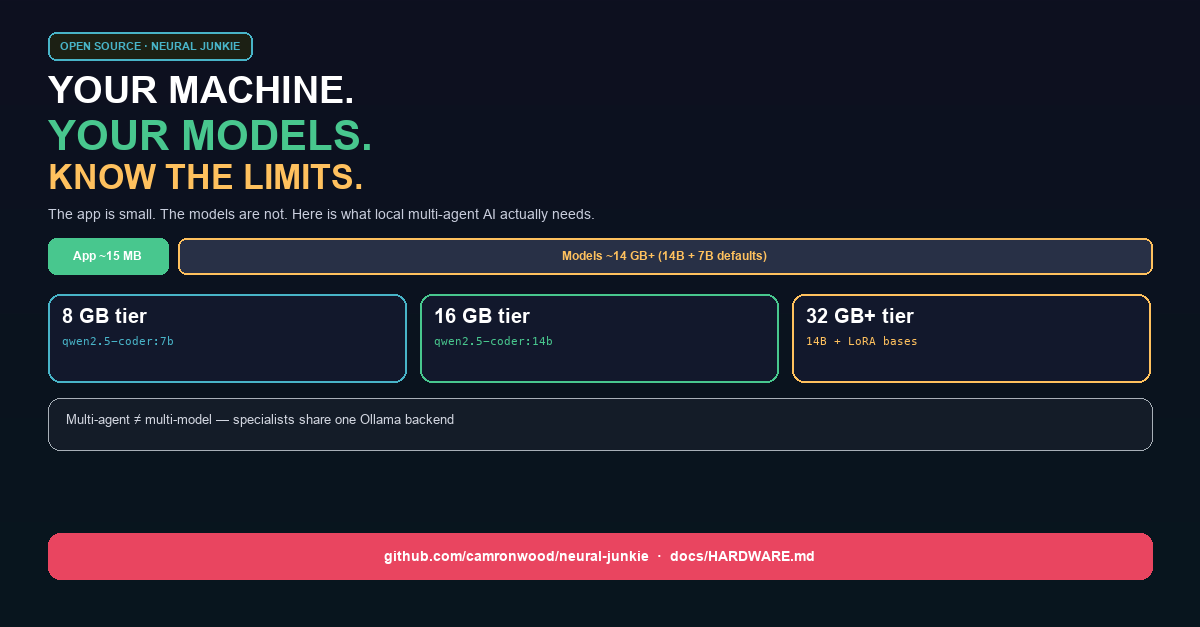
Your code lives on your machine. Your models can too — but only if your machine can carry them.
Neural Junkie is a native desktop workspace where a team of AI specialists — backend engineer, security reviewer, repo expert — collaborates on your codebase, with you approving every file change. Since beta.22, macOS, Windows, and Linux installers ship the Ollama runtime. Open the app, complete the setup wizard, pull a model once, and you are running local inference.
The app itself is small. The hardware question is really about which models you run, how many agents you drive at once, and whether you stay local, hybrid, or cloud-first.
The app vs the models
Download the beta and you get a Tauri desktop shell plus a Go hub sidecar — on the order of tens of megabytes, not gigabytes. Installers also bundle the Ollama runtime (~1–2 GB per platform). That is still not the expensive part.
The first-run pull for software development defaults to two tags:
- qwen2.5-coder:14b (~9 GB) for coding specialists
- qwen2.5:7b (~4.5 GB) for Moderator and Assistant
Add installer + runtime and you are looking at roughly 15–20 GB on disk before you chat. Internet required once for the pull; after that, inference stays on your hardware.
We bundle the runtime, not every model. That is intentional — model choice should match your RAM and your workflow, not bloat every download.
RAM tiers we ship in the product
Starting in this release, the setup wizard and Settings screen read your installed RAM and recommend model tags. The same logic lives in docs/HARDWARE.md and the hub API (GET /api/system/hardware).
| Your RAM | Tier | Developer primary | Good for |
|---|---|---|---|
| Under 8 GB | minimal | llama3.2:3b or qwen2.5-coder:7b | Light chat; hard collab/repo work may need cloud |
| 8–15 GB | light | qwen2.5-coder:7b | Safe local dev; skip the 14B default |
| 16–31 GB | recommended | qwen2.5-coder:14b | Full software pack, repo agents, collaboration |
| 32 GB+ | heavy | 14B + optional LoRA bases / larger experiments | Multi-model library; CUDA LoRA training viable |
Suggested RAM for a model tag uses a simple rule: take the catalog disk size, multiply by 1.25, add 4 GB headroom for OS, hub, and Ollama. Example: ~9 GB on disk → about 16 GB suggested RAM.
If your wizard shows “We recommend qwen2.5-coder:7b instead of 14b,” that is the light tier doing its job. You can still choose 14B anyway — we would rather you know the tradeoff than hit swap and blame the hive-mind.
Multi-agent ≠ multi-model
Neural Junkie runs Backend, Frontend, Security, Architecture, Code Review, and repo experts as separate agents in chat. That does not mean six separate 14B downloads loaded at once.
Specialists share one Ollama backend. You pay sequential inference latency when several agents reply in a thread or collaboration — not six times the VRAM. You do pay hub memory for history, repo indexes, and session state. Large monorepo indexes are capped (2000 source file bodies) so the hub does not grow without bound.
If you need many domain-tuned behaviors without many full pulls, LoRA adapters on shared Llama/Mistral bases are the disk-efficient path — tens of megabytes per role, composed into tags like nj-security:14b. That is a separate story (see our LoRA article), but it matters for hardware planning on 32 GB+ machines.
Optional workloads cost extra
LoRA training from chat or collab history needs the Specialist tuning pack, a Python venv (make deps-lora), and CUDA strongly recommended — CPU training is experimental and slow.
Collaboration quality varies on local 7B/14B models. The hub enforces phase caps and fallbacks, but cannot guarantee plan shape the way a cloud frontier model might.
MCP tool calling is strongest on Ollama (selected flows) and Claude; LM Studio and generic OpenAI-compat endpoints are more limited.
Slack bridge runs in-process on your local hub — no public URL, but the hub must stay running.
macOS builds are ad-hoc signed, not notarized. Right-click → Open the first time if Gatekeeper warns.
We keep a public list: known-issues.html. Items come off when we fix them.
Hybrid is the practical default
Local for iteration — repo Q&A, broad specialist chat, no per-token bill. Cloud for final passes — hard security review, long context, when 14B is not enough. Optional smart routing sends collaboration execution tasks across configured providers using simple heuristics; normal chat keeps each agent’s provider.
Neural Junkie is built for that split from day one.
What we built into the app
- docs/HARDWARE.md — authoritative tier table and limits
- Setup wizard — “Your machine has X GB RAM; we recommend …” on Ollama setup
- Settings → AI Providers — estimated disk and suggested RAM for the selected model tag
- GET /api/system/hardware and GET /api/ollama/library/lookup — same numbers for scripts and future UI
Honest limits beat marketing superlatives. Local multi-agent AI is real; it is also bounded by physics and by what open models reliably do in planning loops.
Try it
Personal open-source project — macOS, Windows, Linux.
Download: https://github.com/camronwood/neural-junkie/releases/latest
Docs: https://github.com/camronwood/neural-junkie/blob/main/docs/HARDWARE.md
After install, ask @Moderator What can Neural Junkie do? — then check Settings → AI Providers for the RAM line on your default model.
Camron Wood — Neural Junkie (personal project)