
Open a long #general thread. Ping a backend specialist. Ask a security reviewer for a second opinion. Start a /collaborate run that lasts three hours.
Every one of those turns needs context — but not the same context, and not all of it.
If you stuff the full transcript, open files, and tool dumps into every model call, local multi-agent dies on latency and RAM. If you send almost nothing, agents reinvent decisions you already made.
Neural Junkie is my personal open-source hub for running AI specialists on your hardware. The bet isn't a shared global brain. It's a Conversation Context Stack that builds the right prompt per turn — and explicit sharing paths when specialists need to see each other's work.
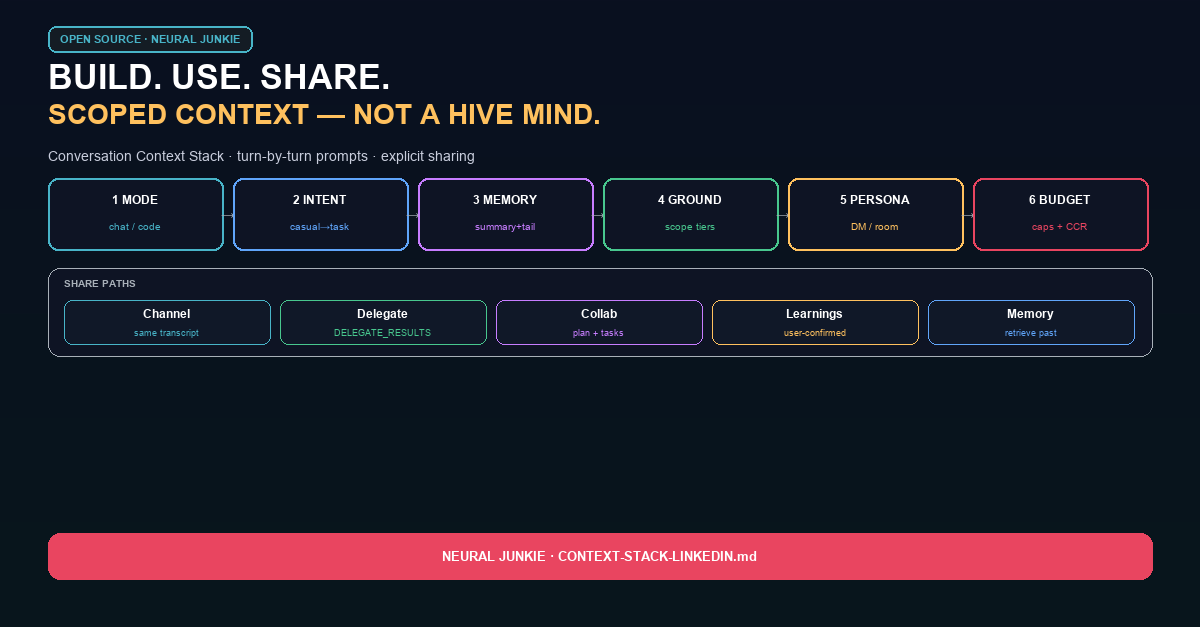
Build: six stages before the LLM
Every user message flows through the same pipeline before any model call:
- Mode — chat, code, or collab (composer chip or auto from signals like file paths and code verbs)
- Intent — closure, casual, meta, substantive, or task
- Memory — rolling session summary + a capped history slice (threads stay thread-scoped)
- Grounding — workspace scope from none → hint → outline → focus → full
- Persona — direct DM, multi-agent channel, or collaboration framing
- Budget — byte caps per section; compress with retrieve refs instead of silent truncation
This is the part most demos skip. They ask a big model to "behave" with a giant prompt. We route context first.
"Thanks!" → canned closure. No LLM. No workspace scan. No MCP tool block.
A casual DM → minimal prompt, two history rows, summary if present.
A refactor with src/auth/middleware.go open → code mode, task intent, focus or full scope, specialist tools on.
Use: what actually lands in the prompt
The agent assembles a system prompt and a user prompt from labeled sections — so you can debug what the model saw:
System side: persona rules, pack domain blocks, MCP tools (when gated on), collaboration plan/lanes, user + project rules, session summary, conversation memory hits, personal learnings, durable conversation state.
User side: your message, attached uploads, ambient editor state, === WORKSPACE CONTEXT ===, linked repos, and any hub-data you explicitly granted.
Then a turn pipeline runs knowledge retrievers when the intent warrants it — codebase search, code graph, memory, learnings, prior references — and stamps metadata so you can audit what was injected.
When context would overflow, CCR (context compression + retrieve) stores oversized sections under ctx-… refs. The agent can pull them back with nj_retrieve_context instead of losing them quietly.
Share: scoped, not hive-mind
There is no single shared context blob across all agents. Sharing is intentional:
Same channel — everyone sees the same transcript; each agent rebuilds its own prompt from that history.
Delegation — the hub silently consults another specialist and injects === DELEGATE_RESULTS === into the responder's prompt. The user never leaves the conversation.
Agent Review — you @mention a different specialist in a thread for a second opinion.
Collaboration — plan, tasks, participants, and workspace context travel with the collab; task dispatch can attach slimmed path context so workers don't need the whole repo dump.
Personal learnings — user-confirmed memories scoped to an agent, the workspace, a collaboration, or globally — portable across sessions when you opt in.
Conversation memory — local embeddings over channel history and collab markdown (plan.md, findings, etc.), retrieved as === RELEVANT PAST CONTEXT === when the question needs yesterday's decision.
Packs don't reimplement the stack. They contribute capabilities and domain prompt appendices; the hub still owns assembly.
What you control
- Composer mode — Chat / Code / Auto
- Workspace scope chip — how much of the open project goes into the turn
- Linked workspaces — multi-repo project sets with cross-repo hints
- Conversation memory + personal learning — Settings toggles, local SQLite / JSON under
~/.neural-junkie - Debug —
GET /api/debug/channel-contextwhen you need to see summary, mode, intent, persona, and budget stats
Why this matters for local AI
Cloud agents can afford giant windows and opaque retrieval. On your laptop, what you put in the prompt is the product.
Build context in stages. Use only what the turn needs. Share through channels, collabs, and delegation — not by cloning one mega-prompt into every specialist.
Docs deep dive: docs/CONTEXT_MODEL.md in the repo.
Download: https://github.com/camronwood/neural-junkie/releases/latest
Camron Wood — Neural Junkie (personal project)