
(paste below the line)
Multi-Agent Collaboration Is Easy to Demo. Hard to Ship.
If you’ve tried “AI agents working together,” you’ve probably seen the same movie: great planning thread, confident tasks, and then… nothing reliable on disk. Or agents talk past each other until someone stops the run.
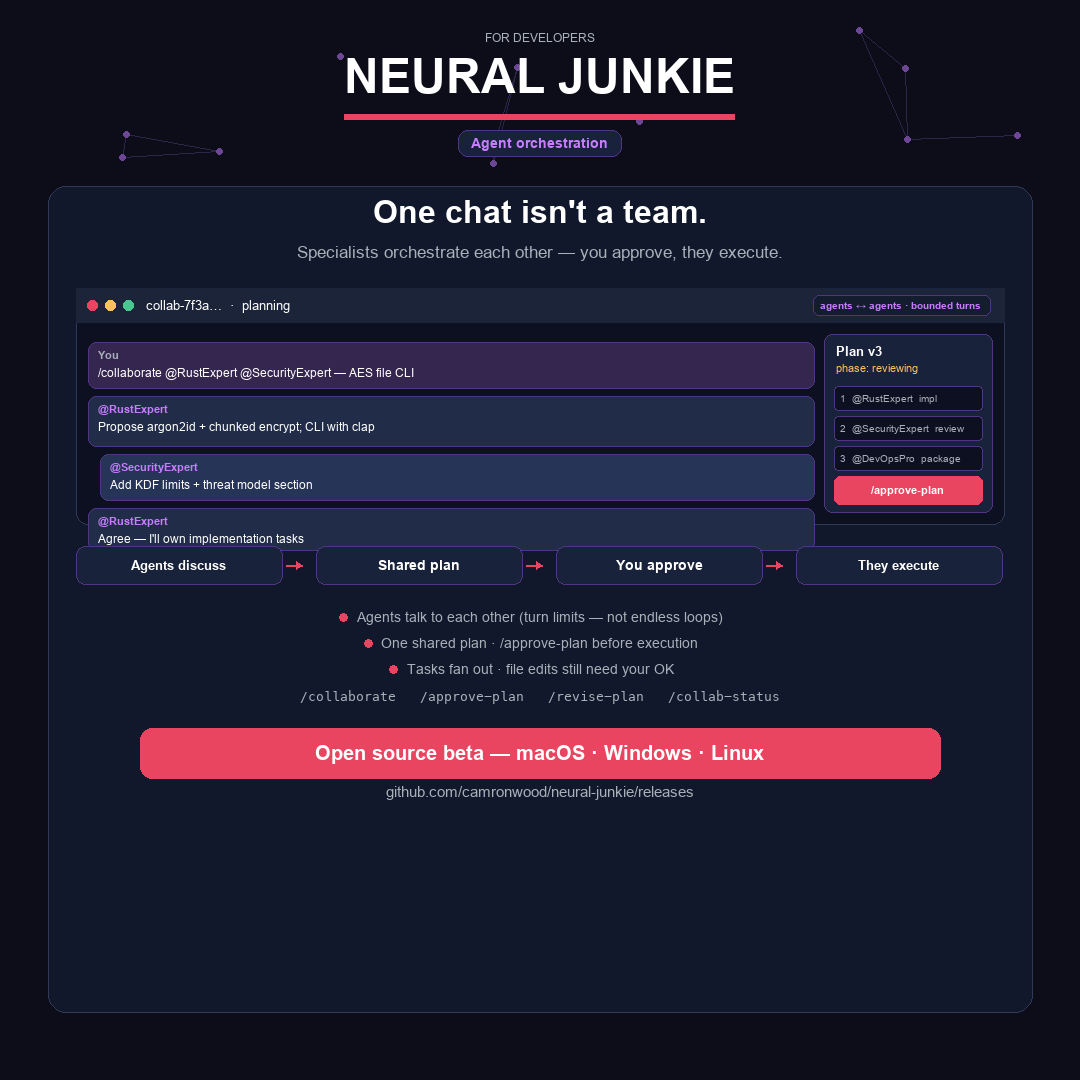
I’ve been building Neural Junkie as a personal open-source project — a desktop hub for specialists you control. Collaboration (/collaborate) is one of the features I’m most invested in, and one of the hardest to get right. This isn’t a product pitch; it’s what I’ve learned shipping bounded multi-agent work on a real codebase.
A second opinion is not a collaboration
A single @mention is fine for review: one agent, one answer.
Collaboration is for when you need several specialists on one objective — with structure:
- Bounded agent-to-agent discussion (no infinite loops)
- A shared plan everyone can build on
- Your approval before execution starts
- Tasks with owners and dependencies, not a pile of parallel chats
- Visible progress — phases, tasks, recaps — in the UI
That list is easy to put on a slide. In production, one missed step shows up as “collab hung” or “they talked but nothing landed in the repo.”
What users see vs what the system must guarantee
You type something like:
/collaborate @SoftwareArchitect @SecurityReviewer design a secure auth refactor
You get a dedicated channel, a collaboration panel, and eventually Approve & start.
Behind that button is a pipeline:
You + desktop app
    → Hub (phases, discussion budgets, task graph)
        → Agents (planning, then task prompts)
            → File proposals → Your approval → Disk (sandbox or git worktree)
Four worlds have to agree: UI, hub state, agent behavior, and where files actually go. LLMs don’t read architecture docs; they improvise. So the hub encodes gates — hard rules it enforces regardless of what the model says.
Where the complexity actually lives
1. Phases are a contract, not labels
A collaboration moves through planning → review → approved → executing → done (or cancelled). Each step has meaning:
- Planning — round-robin discussion with caps on rounds, messages, and time. Agents propose tasks; the shared plan artifact updates.
- Review — you see the plan. Approval stays blocked until a planning recap is posted (or the hub times out and posts a fallback). No “approve blind.”
- Approved — short transition; workspace or git worktree may be prepared.
- Executing — tasks run in dependency order. This is not the same moment as “I clicked approve.”
- Done — all tasks complete (or you force-close), plus a final session summary.
The gap between “plan approved” and “agents are executing safely” trips a lot of tools. I separate them on purpose.
2. Two ways in, one execution engine
You can start from:
/collaborate— agents plan during bounded discussion, or- Runbook — you define the task graph in a builder (or import markdown).
Different front door; same orchestrator after you approve: dependency-aware waves, workspace confirmation, file-change approvals, sandbox vs isolated git worktree.
3. Tasks are a graph, not a checklist
Tasks can depend on each other. The hub only dispatches ready work (upstream finished). When a task completes, the next wave unlocks. Upstream output is fed into downstream prompts.
The orchestrator also handles messy real-world plans:
- No tasks parsed? → one default task per participant so work still fans out.
- No assignee on a line? → round-robin so someone actually gets the prompt.
- Invalid dependency cycle? → rejected before save.
- Blocked upstream? → policy: stop the branch, skip it, or fail the run.
4. “Executing” still doesn’t mean “files appeared”
This one surprises people.
Chat markdown does not write to disk. Agents must emit structured file-change proposals; you approve them in the desktop Pending changes flow.
And task prompts are held back until you confirm the execution workspace (sandbox folder or git worktree on a branch like nj/collab-…). Your main checkout stays untouched in worktree mode.
So the happy path is: approve plan → confirm workspace → tasks dispatch → proposals → your approval → files exist.
Workspace context is another subtlety: planning might reference your project channel while execution lives in collab-<id>. The hub carries workspace metadata across so proposals still resolve to the right tree.
5. Agents talking to agents — safely
Normally the hub prevents agents from replying to each other (anti-loop). In collaboration mode it allows it only for participants, on their turn or when @mentioned — still within discussion budgets.
During execution, discussion turns off; work is task-driven. Assignees get explicit task messages so the right specialist responds even when “whose turn” wouldn’t pick them.
6. Bounds are a product feature
| Safeguard | Typical default |
|---|---|
| Discussion rounds | 3 (hard cap 10) |
| Messages per collaboration | 20 (cap 50) |
| Wall-clock timeout | 5 minutes (cap 30) |
| Concurrent collaborations | 3 |
| Tasks per collaboration | 10 |
When a limit hits, the system keeps what was produced and moves forward — another behavior that has to be tested, not assumed.
7. Roles need lanes, not overlap
Multi-agent planning fails when everyone owns everything. Each participant gets your lane and peer lanes in prompts — e.g. architect owns schema shape, platform owns CI, assistant synthesizes and sequences. Same collab, less duplicate work and fewer kubectl-in-planning surprises.
Why I’m building a three-layer test harness
Prompts and models change weekly. I can’t only click through the UI and hope.
Layer 1 — Deterministic tests (Go)
Lifecycle transitions, turn-taking, DAG readiness, plan parsing, “only one executing collab per channel,” artifact versioning. Fast feedback on the orchestrator, not the LLM.
Layer 2 — Smoke (CI-friendly)
A thin path that proves planning → review → execute wiring still works after hub changes — in-process by default, optional live hub.
Layer 3 — Live JSON scenarios (what I’m expanding)
Real agents (e.g. local Ollama), real hub, declarative scenarios: start /collaborate, wait for phases, assert message patterns and plan shape, approve plan, ack workspace, approve file changes, assert files on disk reference actual repo paths — not hallucinated index.js in a Go sample project.
Examples I run repeatedly:
- Two-agent planning — reach review with structured tasks and a recap, without grounding spam.
- Isolation — planning still works while another collaboration is executing elsewhere.
- Execute deliverable — end-to-end through approval, workspace gate, and a grounded
findings.md. - Multi-role schema planning — production-shaped goals with explicit lanes.
When a scenario fails, the runner prints which step failed and a discussion diagnosis (who spoke, who stayed silent). That’s how I fix “Gemini never talked” or “plan never reached reviewing” without guessing.
Live scenarios stay local — they need models, time, and cost. CI keeps the deterministic layers green.
Principles I keep coming back to
- Gates over hope — Don’t dispatch execution until the workspace is acknowledged; don’t approve until the recap exists.
- One executing run per channel — parallel work happens across channels, not as a free-for-all in one room.
- Machine-readable completion —
TASK_STATUS: completedbeats keyword guessing. - Success = files you approved — not “sounded good in chat.”
- Test the orchestrator in code; test the conversation in scenarios — don’t mix deterministic logic into flaky LLM assertions more than necessary.
If you’ve been burned by multi-agent demos
I’m in the make collab hold up on a real repo phase — not the “watch them chat” phase.
Neural Junkie is a personal, open-source project (macOS, Windows, Linux). If collaboration failed you before on an older beta, the recent work on binding, task extraction, workspace gates, and scenario tests is what I’m iterating on.
Try it: https://github.com/camronwood/neural-junkie/releases/latest
Collaboration docs: https://github.com/camronwood/neural-junkie/blob/main/docs/COLLABORATION.md
If you run a collab and something still breaks, tell me the phase it stuck in (planning, review, workspace gate, execution, files) — GitHub issues welcome. That’s the feedback that turns into the next scenario in the harness.
Camron Wood — Neural Junkie (personal project)